
How to Pair an Apple Pencil Pro with Your iPad Pro
How to Pair an Apple Pencil Pro with Your iPad Pro.
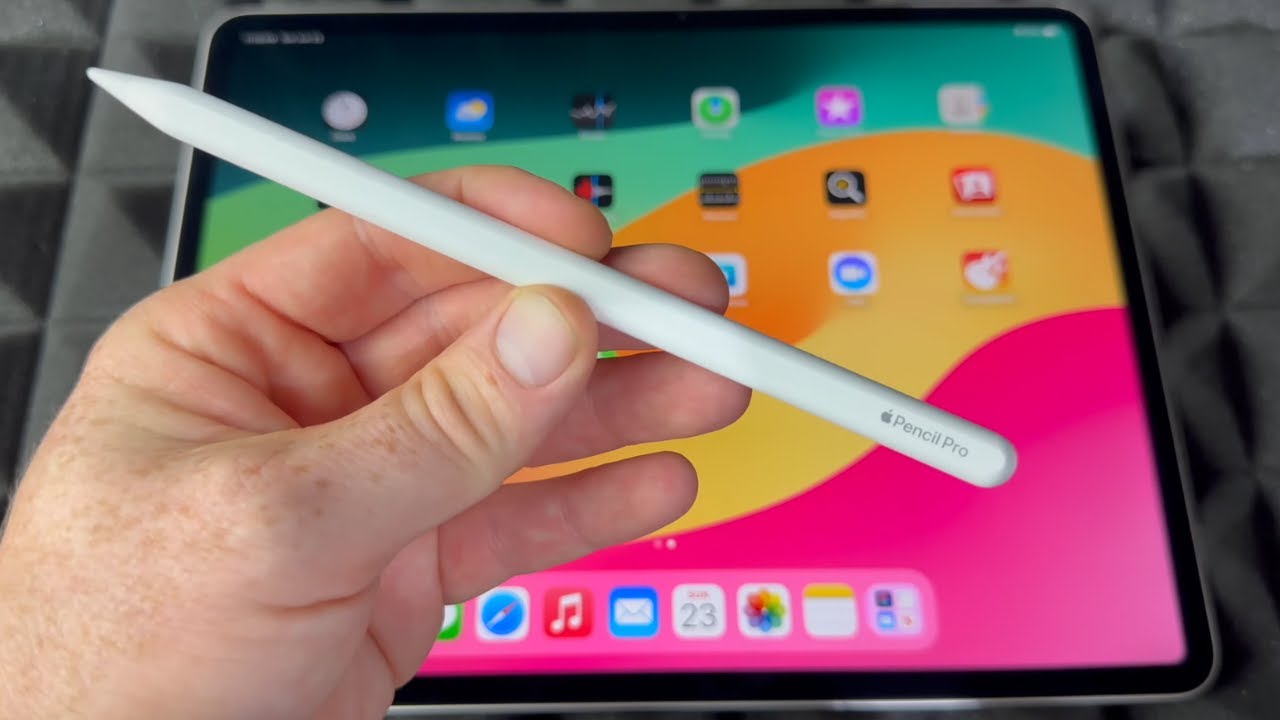
I show you how to pair an Apple Pencil Pro with your iPad Pro. The pairing process is automatic and uses a magnetic connection. I will guide you through the steps to get your new stylus set up and ready to use.
Amazon:*
iPad Pro M5 13 inch https://rex.red/iPad-Pro-M5-13-inch
iPad Pro M5 11 inch https://rex.red/iPad-Pro-M5-11-inch
iPad Air M3 https://rex.red/iPad-Air-M3
iPad Pro M4 https://rex.red/iPad-Pro-M4
iPad A16 https://rex.red/iPad-A16
Apple Pencil Pro https://rex.red/Apple-Pencil-Pro
Apple Pencil 2 USB-C https://rex.red/Apple-Pencil-2-USB-C
iPad Pro M5 Magic Keyboard https://rex.red/iPad-Pro-M5-Magic-Keyboard
iPad Pro M5 Folio Case https://rex.red/iPad-Pro-M5-Folio-Case
iPad Pro M5 Screen Protector https://rex.red/iPad-Pro-M5-Screen-Protector
Showing you on iPadOS 26 on iPad Pro M5 13 Inch 2025 model.
iPad Model Code MDYJ4TY/A Model A3360 iPad Pro 13 inch Wi-Fi 256GB Space Black Standard glass
EAN Barcode: 195950398168
Apple Pencil Pro Model MX2D3ZM/A A2538 manufacture date 05/2025.
EAN Barcode: 195949573125
To start pairing Apple Pencil Pro, you simply attach it magnetically to the side of your iPad Pro. You need to place it on the right side of the tablet, on the magnetic strip. This is the same area used for charging. When you attach it correctly, a Bluetooth pairing animation will appear on your screen.
I will show you how to complete the Apple Pencil Pro setup. Once the animation appears, your iPad Pro and Apple Pencil Pro are connected. You do not need to go into the Settings app or the Bluetooth menu for this automatic pairing. This method also keeps your Apple Pencil Pro charged.
Learn how to check if your Apple Pencil Pro is connected. You can look in the Settings app under Apple Pencil to see its battery level and settings. If you are having issues, learn how to fix Apple Pencil Pro not pairing. I show you what to do if the pairing popup does not appear, which can include checking the magnetic connection and ensuring Bluetooth is enabled.
Learn how to use Apple Pencil Pro features like the barrel roll or squeeze function. These features are available as soon as the pairing is complete. This guide covers the magnetic pairing process for the iPad Pro and how to confirm a successful connection. Learning how to pair your Apple Pencil Pro correctly ensures you can start using it right away for drawing, note-taking, and other tasks.
Watch the video carefully without skipping to see all the steps needed in this video.
Subscribe and click the Bell to watch more videos.
IONHowTo https://www.youtube.com/channel/UCx4Qbp3iC97kQzj7e7g7slg
RedNumberONE https://m.youtube.com/channel/UCYdm-YlcfOvCbKeh60EkMZg
Buy merch https://store.ionhowto.com/
Join this channel to get access to perks:
https://www.youtube.com/channel/UCx4Qbp3iC97kQzj7e7g7slg/join
Any questions?
Feel free to ask in the comments section below.
Subscribe, Like and SHARE this video with your friends!
We earn money from qualifying purchases using our affiliate links.
Affiliate links are marked with a star. *
When you use our * links, you support this channel.
As an Amazon Associate I earn from qualifying purchases.
Website https://www.ionhowto.com/
Food Recipes: https://www.rednumberone.com/